

De ROKR Space Shuttle LKA02 is het soort bouwproject dat weigert stil te blijven nadat het laatste houten stuk op zijn plaats klikt. Het heeft dubbele booster-raketten, een dynamisch lanceerplatform, robotarmen, bewegende tandwielen en oranje-blauwe LED-vlam effecten, dus het voltooide model vraagt natuurlijk om meer dan een spaarzaam hoekje op een plank.
Dat is ook hoe bouwers erover praten in de Robotime Community. Ze posten niet alleen: "Ik heb het af." Ze laten het draaien. Ze testen de lichten in het donker. Ze verven de boosters. Ze werken door plakkerige schuiven en schakelaars. Dan delen ze het exacte moment waarop een veeleisend bouwproject verandert in een lanceerscène die ze trots willen tonen.
Harley noemde de Space Shuttle een "super build" en plaatste het in zijn top drie ROKR-bouwprojecten. Debbie_McCormick gaf toe dat ze het had uitgesteld na het lezen over de uitdagingen, maar het uiteindelijk trots en tevreden afmaakte. Nita_Davis beschreef dat ze "door het dolle heen" was toen haar aangepaste shuttle perfect functioneerde. Over al die berichten heen is één thema duidelijk: dit is een model met hoge moeilijkheidsgraad mechanisch model, maar de weergave voelt verdiend.
Hier is hoe ROKR-fans de Space Shuttle LKA02 laten lijken, bewegen en voelen als een voltooide missie.
Begin met de prestatie
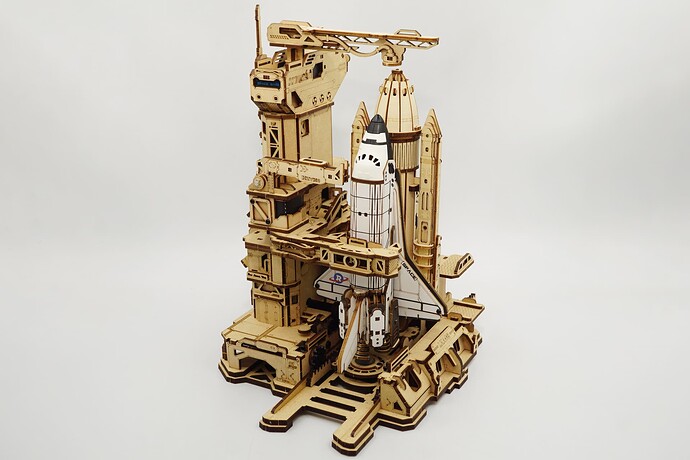
Grote mechanische bouwprojecten dragen een ander soort trots. De Space Shuttle is niet alleen een houten 3D-puzzel om in elkaar te zetten; het is een display-klaar mechanisch model dat de bouwer vraagt om langzamer te gaan, vaak te testen en de bewegende delen te respecteren.
Dat is waarom de eerste displaybeslissing emotioneel is, net zozeer als praktisch. Zet de shuttle ergens waar het kan worden gezien als een prestatie. Een diepe boekenkast, een console tafel, een hobbykamer kast of een bureau met voldoende ruimte kunnen allemaal goed werken. Het belangrijkste is dat het model ruimte heeft om opzettelijk te lijken, niet gepropt in wat er ook maar over was.
Community-bouwer tschoby ving dat gevoel nadat hij het model had voltooid: "Na een paar hobbels, schittert het eindelijk in kleur en is het klaar om zijn plaats op de plank in te nemen." Die zin zegt veel over de kit. De plank is niet alleen opslag. Het is waar de inspanning zichtbaar wordt.
Geef het lanceerplatform ruimte om te bewegen
Omdat de ROKR Space Shuttle een bewegende lanceerstructuur heeft, is de beste displayplek niet altijd de krapste. Laat ruimte rond de basis, toren en robotarmen zodat de beweging soepel kan voltooien zonder boeken, lijsten, muur randen of naburige modellen te stoten.
Als je wilt dat mensen het model in één oogopslag begrijpen, laat zowel de shuttle als het lanceerplatform zien. Een iets diepere plank werkt beter dan een smalle rand. Een vitrinekast kan ook mooi zijn, zolang de verticale ruimte het model in staat stelt om met vertrouwen te staan.
Harley's korte recensie zegt het netjes: het model is "zelfs beter als het draait." Voor deze kit is beweging een onderdeel van de weergave. Als de gekozen plek de beweging verbergt, verbergt het de helft van het verhaal.
Draai het voor het moment van verrassing
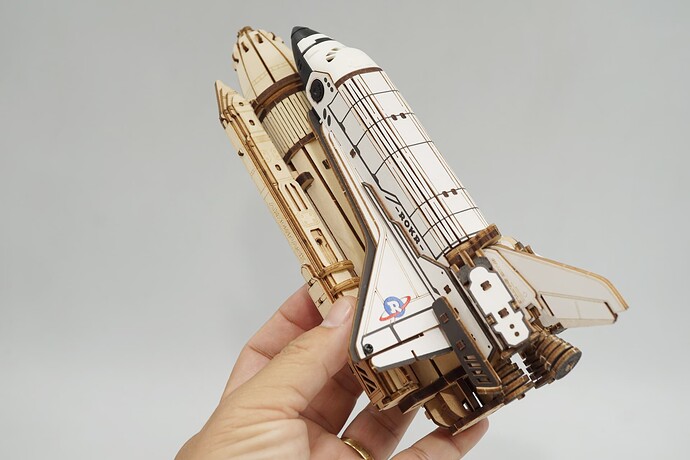
Ruimteschepen zien er zelden op hun best uit als ze plat tegen een muur worden gedrukt. De Space Shuttle heeft een sterkere aanwezigheid wanneer kijkers de boosters, de lanceerstructuur, de basis en de mechanische armen in relatie tot elkaar kunnen zien. Draai het model iets zodat het eerste zicht actie suggereert.
Een lid van de community, Sasa, reageerde op een voltooide video door te zeggen dat ze "niet wisten dat deze kit zo bewoog." Dat is de kracht van een goede displayhoek. Het onthult de verrassing voordat iemand het hoeft uit te leggen.
Voor een compacte plank is een kleine diagonale draai voldoende. Voor een groter displayoppervlak, laat een beetje negatieve ruimte rond het model zodat het voelt als een miniatuur lanceerscène. Het doel is niet om het geïsoleerd te laten lijken. Het is om de shuttle voldoende visuele ademruimte te geven om klaar te voelen voor de aftelling.
Laat de lichteffecten leiden
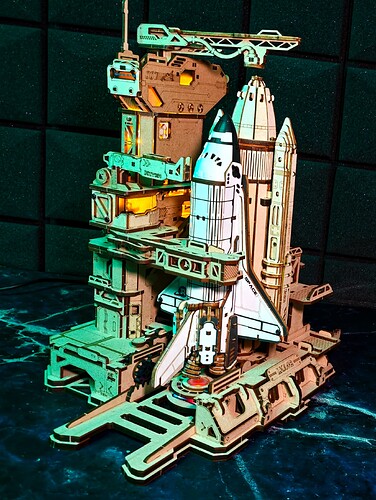
De oranje-blauwe LED-vlam effecten van de Space Shuttle zijn een van de sterkste weergavedetails, en community-bouwers merken het verschil op. In een fotoalbum draad, Jill_Francisco prees de donkere foto met de lichten aan. In Dmitriy_Nazin's recensie draad, Yoki zei dat de verlichting het model deed voelen als "een geheel nieuw kleurenschema."
Dat is nuttig displayadvies. Je hebt geen ingewikkelde opstelling nodig om het model dramatischer te laten voelen. Een donkere plank achtergrond, een kleine zijlamp of een zachte LED-strip achter de weergave kan helpen de ingebouwde lichteffecten te laten opvallen.
Houd de ondersteunende verlichting eenvoudig. Warm, indirect licht kan de houten structuur ambachtelijk en kalm laten aanvoelen. Een donkere displayhoek kan het vlam effect filmischer maken. Hoe dan ook, laat de eigen verlichting van de shuttle het brandpunt zijn in plaats van ermee te concurreren.
Verf met een plan
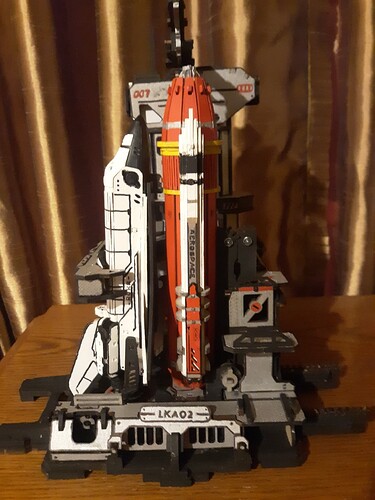
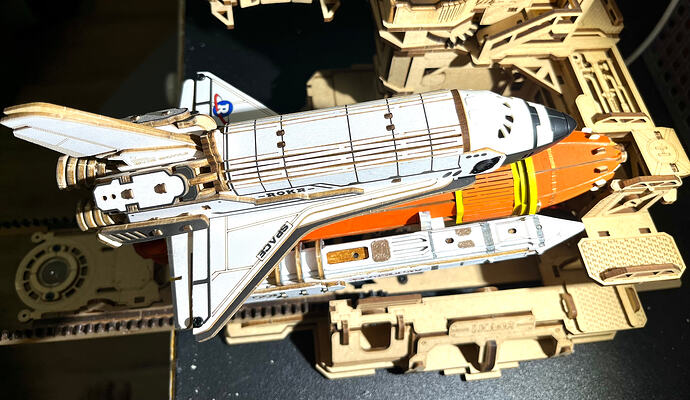
De Space Shuttle is ook een favoriete canvas voor bouwers die hun modellen willen personaliseren. Sommigen houden de originele houtkleur. Anderen verven specifieke delen om een echte shuttle te echoën, een kamer te matchen of simpelweg het voltooide stuk meer hun eigen te laten voelen.
Alicesharpe voltooide het model in "drie verschillende grijzen en zilveren" en deelde een video die lof oogstte voor zowel de beweging als het schilderwerk. Gentoo_Builds verfde de brandstoftank en boosters om de echte shuttle na te bootsen, met oranje en geel op de tank en wit en metallic tinten op de boosters. Nita_Davis ging gedurfder met zwarte, zilveren, witte, gele en rode details, en vierde toen dat het uiteindelijke model perfect functioneerde.
De les uit die berichten is niet dat elke bouwer moet verven. Het is dat aanpassing het beste werkt wanneer het een duidelijk visueel idee heeft. Een realistisch NASA-geïnspireerd palet, een slanke metallic uitstraling, een donker industrieel basis, of een kleurenschema dat bij je kamer past kan het model opzettelijk laten aanvoelen.
Als je verft, raden community-bouwers aan om vooruit te denken. Verflagen kunnen dikte toevoegen, vooral op delen die schuiven of bewegen. Schuren, waxen en testen worden nog belangrijker na aanpassing.
Pas aan nadat je het mechanisme begrijpt
ROKR-fans kunnen wonderbaarlijk vindingrijk zijn, en de Space Shuttle lijkt die energie uit te nodigen. Martins_Assembly_H beschreef zijn aangepaste shuttle als het resultaat van dagen van onderzoek, brainstormen, testen, falen en opnieuw testen. De uiteindelijke beloning was dat het model "echt van jou" aanvoelde.
Dat is een goed principe voor elke wijziging. Bouw en begrijp eerst het model zoals het is ontworpen. Kijk naar de lanceerbeweging. Let op waar de armen bewegen. Zie hoe de schakelaars en lichten zich gedragen. Zodra je het originele ritme kent, wordt het gemakkelijker om te beslissen wat een aangepaste achtergrond, geverfde basis, extra displayverlichting of een ambitieuzere modificatie zou moeten toevoegen.
Permanente veranderingen kunnen lonend zijn, maar ze moeten het mechanisme ondersteunen in plaats van ertegen te vechten. Op een bewegend houten model moeten schoonheid en tolerantie samenwerken.
Behandel probleemoplossing als onderdeel van het bouwverhaal
Veel Space Shuttle berichten vermelden dezelfde realiteit: dit is een uitdagende kit, en het beloont geduld. Dat maakt het voltooide model niet minder bevredigend. Sterker nog, het verklaart waarom bouwers zo trots klinken wanneer de beweging eindelijk soepel verloopt.
Dmitriy_Nazin deelde dat de schuifbasis van de shuttle in het begin niet terugkwam. Het kostte meer dan twee uur om het probleem te vinden: een verschoven metalen tab op de railknop. Eenmaal gecorrigeerd, werkte het model zoals verwacht. Debbie_McCormick bood een vergelijkbare praktische les na het voltooien van de hare: neem je tijd, concentreer je op de instructies, test vaker dan vereist, en wax meer bewegende delen.
Een van de duidelijkste regels van de community kwam van Debbie's tips: als hout hout raakt en het beweegt, wax het. Bouwers vermelden ook herhaaldelijk het schuren van bramen, het controleren van bedrading, het testen van elektronica op de juiste momenten, en het nauwlettend letten op schakelaars.
Met andere woorden, beschouw een pauze of plakkerige beweging niet als falen. Voor een mechanisch model met hoge moeilijkheidsgraad is diagnose onderdeel van de missie.
Gebruik community-tips voordat frustratie opbouwt
De Robotime Community is vooral nuttig voor een model als dit omdat veel bouwers de lastige delen al hebben gedocumenteerd. Nita_Davis deelde gedetailleerde bouw- en schildertips. Martins_Assembly_H creëerde een stapsgewijze serie voor de assemblage van de Space Shuttle en later een probleemoplossingsgids.
Die berichten zijn belangrijk omdat ze een complex project omzetten in iets meer benaderbaars. Wenbare schreef dat de mechanische-arm fase "veel minder intimiderend" aanvoelde met een duidelijke uitleg. JDisaduck merkte op dat veel mensen leken te worstelen met de kit en dat visuele begeleiding toekomstige bouwers zou kunnen helpen.
Als je shuttle pauzeert, vastloopt of weigert een cyclus te voltooien, vertraag dan voordat je iets forceert. Vergelijk je bouw met foto's of video's, controleer de exacte fase waar de beweging stopt, en zoek advies van bouwers die al soortgelijke problemen hebben opgelost. Een zorgvuldige controle van tien minuten kan een lange avond van gissen besparen.
Draai het als een kleine tentoonstelling
Een slim idee uit het LEGO-displayartikel is dat grote bouwprojecten niet voor altijd op één permanente plek hoeven te blijven. Ze kunnen worden behandeld als kleine tentoonstellingen.itons: uitgelicht, gefotografeerd, genoten, en vervolgens gedraaid wanneer de kamer of collectie verandert.
Dat werkt prachtig voor de ROKR Space Shuttle. Toon het centraal voor een tijdje. Voer de lanceringbeweging uit voor vrienden of familie. Maak een set foto's in natuurlijk licht en een andere met de LED's die gloeien in een donkerdere kamer. Als je andere ROKR mechanische modellen verzamelt, draai de shuttle ernaast zodat elke bouw zijn eigen moment krijgt.
Omdat dit model beweging en verlichting heeft, profiteert het van actieve weergave. Het is niet alleen iets om stof af te vegen. Het is iets waar je naar terug kunt keren, aan kunt zetten, kunt aanpassen en opnieuw van kunt genieten.
Wie zal het meest genieten van de ROKR Space Shuttle?
Op basis van feedback uit de gemeenschap is deze kit vooral lonend voor bouwers die genieten van een uitdaging, mechanische beweging en een afgewerkt model met echte tentoonstellingswaarde.
Het is een sterke keuze voor:
- ROKR-fans die houden van hoge moeilijkheidsgraad houten 3D-puzzels.
- Ruimte- en techniekenthousiastelingen die een lanceringsthema mechanisch model willen.
- Bouwers die genieten van schuren, testen, afstemmen en een mechanisme soepel laten draaien.
- Hobbyisten die een schilderbaar model willen met ruimte voor persoonlijke stijl.
- Verzamelaars die op zoek zijn naar een gespreksonderwerp met lichten en beweging.
Het is misschien minder ideaal als je een snelle, laagdrempelige bouw wilt. De Space Shuttle vraagt om focus. Maar voor bouwers die genieten van het proces, is dat precies waarom het afgewerkte model betekenisvol aanvoelt.
Toon het met countdown-energie
Het sterkste thema in de community-berichten is niet de moeilijkheid. Het is trots. Bouwers noemen het model indrukwekkend, cool, bevredigend, magisch en de moeite waard. Sommigen tonen het met gepolijste foto's. Sommigen filmen het terwijl het draait. Sommigen verven het. Sommigen passen het aan. Sommigen vieren gewoon het moment dat het eindelijk werkt.
Dat is de geest van de ROKR Space Shuttle LKA02. Het is een bouw voor mensen die net zo veel van de reis genieten als van de uiteindelijke weergave. Geef het ruimte, zet het goed in de hoek, laat de lichten spreken en behandel het mechanisme met geduld.
Zodra het compleet is, verdient het meer dan een hoek. Het verdient countdown-energie.
--0.jpg?w=1280&h=720)